Is it better? Reexamining the Canon EOS-M with the 2.0.2 firmware

I think that I've mentioned that I like this little camera. Construction is solid, control layout is decent, images are good out of both the 18-55 kit lens and the 22/2 pancake. Video is quite good with no AF noise (EF-M lenses are all STM type), although the built in microphones give you what you expect - utter crap. The camera fits the hand well is only marginally bigger than the Sony RX-100. But the camera as shipped had a real problem. It's autofocus performance could be described as slower than molasses flowing uphill in winter and that would have been charitable. Compounding negative speed, it tended to hunt back and forth in low light resulting in most reviewers desiring to see how well the device bounced. Consequently, Canon couldn't give the darn things away to the point that when the original kit came out with the 18-55 lens and the 90EX micro flash at around $900 it was laughed all the way back to the warehouse. Today that same kit, less than one year later still languishes on dealer shelves at $499 (sale price, reg $699) collecting dust, that's how bad a reputation the camera has. Canon has not helped by shipping only two EF-M lenses until the recent debut of the 11-22 zoom which is afflicted by the same slow lens speed as the default 18-55. Can anything change the tune for the little mirrorless Canon?

Canon this past week releases a major firmware update for the camera. While they chatter inanely about better foreign language support in the menus, those issues weren't stopping sales. The new firmware purports to significantly improve autofocus performance so I arranged with Chris Atkinson at Henry's in Newmarket to borrow their demo, upgrade the firmware and see what's new. The camera is very familiar, it's the SAME one I tried out over six months ago...

I fired a few frames with the default firmware, charged the battery and ran the firmware updater. It completed successfully.

So the big question. Is autofocus performance improved in terms of speed? Yes, it is better. Is it a lot better (as in NEX-5n better)? No, but it is Fuji X better. An NEX-5n or OM-D will still kick its butt around the corner and I won't even talk about the size of the can of whup-ass the RX100 would open on it. But it's better. Usable better. In good light outdoors, focus lag was not noticeable. Indoors, particularly with the 18-55 at the 55mm end (resulting in a max opening of f/5.6), there had better be mucho de contrast or the camera will hunt and then give up cold. AF performance on the 22mm f/2.0 is better overall.

The lenses are very sharp but as the barrels are REALLY narrow (like the Sony NEX barrels) and they are not brilliant optics when it comes to vignetting and distortion. Using the lens profile correction in Adobe Lightroom 5, the corners in shots taken with the 22/2 brightened up nearly 2 STOPS, which is not horrible but not very good either.

Since internally this is basically a T4i, it should be a lot better than it is. My daughter has a T4i and it's plenty quick to focus and does pretty well in crappy light. She uses it primarily for video and like the EOS-M the internal microphones make you yearn for manual audio controls or a sharp needle to destroy them forever. Good video with bad audio is bad.

The firmware update doesn't change the fact that you have to do most everything through the touchscreen. Touchscreens on my phone are ok, not ok on cameras. The update also didn't add a viewfinder so you still look like a dork holding the thing out in front of yourself like some lost tourist, with all the inherent stability loss that goes with hanging your arms out into space.

So what's the verdict?

I've attached a gallery of images that were shot as either RAW or JPEG in camera, imported to Lightroom 5 and given my basic workflow (less than 30 seconds spent per image). Using the lens profile correction is REQUIRED, but after that what comes out of the box is pretty darn good, certainly as sharp as anything else in this DSLM APS-C sensor space, with good contrast and typical Canon colour fidelity. If you've never experienced Sony autofocus you might be just fine with the enhanced AF brought about by the firmware update. It's not a good ambassador for the DSLM space though, with shoddy AF in poor light, a touchscreen dominated UI, small battery and no viewfinder (that LCD is nice but glares out fast in sunlight) and even at the sale price of $499 you can do better. There's allegedly a newer EOS-M enroute, but this critter definitely feels like Canon's version of the red-headed stepchild. Maybe if they dropped the price to $249….

REVIEW : The Westcott Rapid Box Octa 20" and 26"

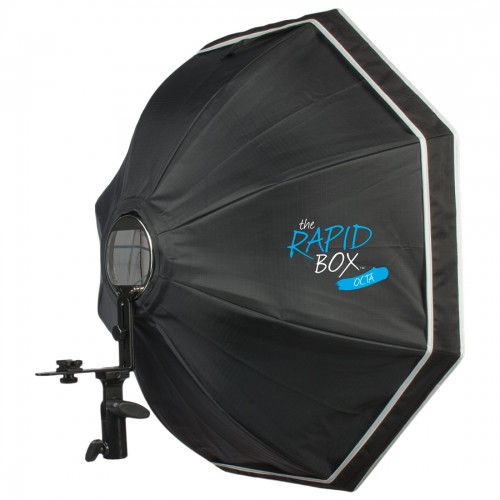
RapidBox26OctaFJ Westcott has been doing umbrella frame softboxes for a while, and I like their Apollo line EXCEPT when you want to wirelessly control your flash with infrared. Because the flash is "in the box" infrared control fails most of the time. Westcott recently released a new family of products called Rapid Box. There are two octagonal softboxes and a small strip light. All use an umbrella stay collapsible system to make the units transportable, but most importantly, place the hotshoe flash on an included bracket outside the box. With the support of Chris and Louise at Henry's in Newmarket Ontario, I was able to do a test of the Octa versions of the Rapid Box units.

Assembly of the box itself is a no brainer if you have ever used an umbrella. Then simply attach the bracket on the box to the flash bracket that comes in the box by rotating the bracket arm and screwing in the flash arm. The only way it could be simpler is if it came fully assembled but that would defeat the superb portability of the unit when packed into the included travel bag. Total set up time including putting the whole thing on a light stand is less than five minutes if you pace yourself.

Mount the flash on the bracket and adjust the height so the flash head just fits inside the opening so all the light from the flash gets into the box. The octal and strip boxes are lined with a high quality silver foil for lots of efficiency and there is a simple diffusion panel that velcro attachs to the edge of the box at the front.

Using either the Nikon Creative Lighting System, Canon Creative Flash System (Infrared) or Canon RT Flash System (Radio) is a breeze. Set the camera flash to be master and to act solely as a trigger. Set the flash attached to the Rapid Box to Slave mode and start shooting. In order to confirm ease of use, I tested in eTTL, eTTL II modes on Canon and iTTL on Nikon. The exposures were excellent without any real need for compensation, leaving control in the hands of the artist. I even made some test exposures using old Canon 580EX units at my friend's home and the shots were beautiful right off the bat with soft clean light that wrapped very well when the light stand was placed properly.

The general rule for any soft box is to put it as close to the subject as possible while keeping it out of frame. Used in this way the Rapid Box is a great choice. Regular readers know that my raved about offering is the Lastolite Joe McNally Signature soft box and I still prefer it for portraits because its light is so creamy. However, I would say that the Rapid Box is as good as the regular silver interior Lastolite and much nicer than the Westcott Apollo collapsible softboxes. The 20" octal sells for around $169 and the 26" octal for around $199. The strip box is 10" x 24" and sells for around $199. There is also an internal reflector disk available to force more internal bouncing around for about $25. I have one of these for my Elinchrom Deep Octa and it does serve to reduce hot spots, although I did not try the Westcott Rapid Box version.

You can find Westcott products online or at Henry's locations in Canada. Support them if you would in thanks for providing evaluation products to me to test.

First Look : Pentax MX 1

MX 1 ChromeI remember the Pentax MX from about 30 years ago. It was a good quality SLR. Pentax has gone through a lot since then, most recently being acquired by (and in some opinions, saved by) Ricoh. My friend Steve Davies has been with Pentax Canada for a long time and when I saw him at a trade event this week, he asked me what I thought of the MX 1. I, as one might expect, gave him the dumb look, since I did not know what he was talking about. Never to let a challenge go unpunished, I determined that the MX 1 was stocked at the camera store where I work on a very part time basis, and with the assistance of the most awesome Louise Booth, obtained one to do a first look with. The first thing you notice about the MX 1 is the weight. If you've handled other larger sensor point and shoot style cameras, the first difference you feel is construction. With top and bottom plates of brass, finished in either gloss black or retro silver, the MX 1 feels built tough. The lens is a 4x zoom measuring from 6mm to 24mm with an aperture of f/1.8 to f/2.5 That translates in 35mm language to a range of 28mm to 112mm so wide angle to short telephoto, with an aperture range of f/8.4 to f/11.6. This is decent range for a pocket camera, but isn't really going to rock low light. ISO runs from 100 to 12800 but I found it gets noisy around ISO 1600. Still, certainly more than some other cameras of this type. It incorporates a CMOS sensor noted as 1/1.7". I confess that this tendency of most manufacturers to play silly buggers when quoting sensor size makes my teeth hurt so some basic math says the sensor is about 0.68 inches on the diagonal. Certainly larger than the generic point and puke, but less than the much loved (by me) Sony RX-100, but similar to Canon's S110, Olympus' XZ-2 and the Lumix LX7. The sensor delivers files of maximum 12MP.

Like other cameras of this type, the camera captures not just in JPEG but in RAW format as well and a big clap on the back to Pentax for selecting the open standard DNG format for it's RAW files, so you don't need some wonk-ola software to get at your RAW files such as one encounters with oh say Fujifilm. Don't kid yourself though, the in camera JPEGs are generally the way to go until Adobe, DxO and the rest of the lens profile magicians get profile corrections available because when I shot RAW+JPEG fine on the MX 1, the RAWs were, to put it softly, showing a bit of the old barrel distortion. The in camera JPEG builder applies the needed lens correction so the JPEGs look pretty decent, albeit without the colour depth because of the JPEG "parsley to throw away" storage model.

By the way, if that phraseology doesn't mean anything to you, go find the episodes of The Flintstones where Fred and Barney buy a Brontoburger stand.

Charging the battery takes just over two hours and you can charge the battery out of the camera because it comes with an external charger, like any intelligent camera should. Manufacturers who are too frakking cheap to put an external charger in the package and then require that you charge the battery in camera, need to have Mr. Bat meet Mr. Kneecap. Pentax says you should get about 290 shots on a charge, putting the MX 1 in the same park as its competitors.

The menu system reminds me of most Japanese camera menu systems, meaning it looks like it was built after the architect just came off a three week long sake and Suntory bender. Adding insult to injury is a font style that brings back memories of the long dead and unlamented MGA from the original IBM PC. I would have hoped that Ricoh would have had some influence into the menu system. It's confusing because different presses do different things for different areas. This can be addressed in firmware so I hope that Pentax listens to buyers and hires a good UI company to redo the menu system. Button layout is pretty straightforward. Shutter is on top with a zoom rocker around it, video start / stop is a separate button, There is a shooting mode dial and a separate exposure compensation button giving ±2 stops in ⅓ stop increments. The power button is easy to find without hunting for it and it glows a bright green when the camera is on.

Modes include GREEN, Auto Pict, SCN, HDR, USER, M, Av, Tv, P and Movie. I expect many buyers will use GREEN or Auto Pict and for the most part they are pretty darn functional. You have to manually popup the flash to do any flash function selections and it emerges on a little cantilever arrangement like many other cameras of this type. The switch is on the upper left side of the camera. It's bright enough for basic work but it is very small and so harsh shadows and blow outs should be expected. There is no hot shoe, so this is what you get. It offers a couple of red-eye modes, as well as slow sync and "second-curtain" sync.

The back has a rotary wheel that does different things depending on the mode you are in. There's an AE lock button and the usual four way rocker. The rocker labelling needs work. The flower that everyone naturally believes is macro mode actually takes you into the different selectors for focus mode. Not all that intuitive. There's also a Play button, a Menu button to open that door to hell mentioned earlier and an Info button whose function varies depending on mode from doing nothing at all to popping up a Hollywood Squares style grid to select different configuration options. The Play button also empowers the rocker to move back and forth but if you rocker down, you get access to all the "fun" stuff, like in camera filters, HDR simulation, toning, Instacrap style things and a bunch of other junk I would never use, but that's probably needed for someone, though I cannot imagine who that might be.

The LCD display is large and bright. The image quality displayed is very good and I rate the LCD as one of the best elements of the little camera. It tilts up or down via a cantilever arm system that while solid is not all that smooth. The other side of that is that it doesn't flop all over the place.

The tripod socket is metal and screwed into the brass base plate so while a little thing, it indicates that some engineer has been thinking about the more demanding user.

Image quality is easily as good as any of the cameras in the price range, which is about $450. The lens is sharp and contrast is good, but beware the tendency to barrel distort. A close in shot in wide angle mode definitely made the upper right of Sondra's face start to wander into the corner. I won't publish that one, to avoid getting yelled at but trust me on this, you don't want to be taking head shots with this thing in anything but full telephoto.

The 4X zoom is adequate. There is also intelligent zoom available when shooting in lesser JPEG quality that basically reduces the MP count so as to use more of the sensor for zoom. A peer at the store says that doing this doesn't diminish quality. We're going to agree to disagree, I think there is a visible quality drop. The camera also has digital zoom, which as all readers should know is basically a simple way to make a decent shot look just like cat vomit.

I shot a small range of images with the camera because I only had it for a short time. I think that the JPEGs are quite good and expect the RAWs to be more usable when there are lens profiles available for Lightroom etc.

The Pentax MX 1 is a fine camera. I did not find anything that really set it dramatically apart from its competition in the price point except that it has much sturdier construction. Certainly it's very usable and the lens is very sharp. The menu systems need work, but in fairness, most menu systems look like they were designed by rats on typewriters. I think it's a strong contender in a field of good options. Certainly the price point gets it into the hands of people who might otherwise look at the excellent Sony RX-100 or the laughably sad Nikon Coolpix A.

The Leica X Vario. Mini M?

8246-e1370992716957.jpg

Leica X VarioAs regular readers will know, I am a Leica owner.  I shoot an M9 now, have an M240 on seemingly endless backorder and my first Leica was an M4-P with motor winder and 35mm f/2.0 lens.  I still miss the M4-P even though the only film I shoot these days is in my Sinar P. There has been a LOT of noise about this new Leica that has been referred to as the Mini M.  But that's not right.

It's an X, but Leica refers to it as the Mini M.  Confused yet?

Specifically it is the X Vario and fits into what for Leica is the point and shoot marketplace.  I have shot the Leica X1 and really liked everything about it except the price and think that the X2 was a major step up.  Except for the price.  Now M cameras are really stupid expensive but there is just something about a real manual focus rangefinder...

Anyway about the X Vario.

Off the top, it is an X series camera, so that means autofocus, non-interchangeable lens on with a larger sensor than a traditional Point and Shoot.  Internally known as the Type 107 it is a CMOS APS-C sensor based device capturing 16.2 megapixels.  Captures can be RAW in the open source DNG format or Leica's 4 JPEG resolutions.

The lens is a Leica Vario-Elmar 18-46mm f/3.5-6.4 ASPH.  This translates to about a 28-79 in the full frame world and it incorporates 2 aspherical elements.  That will mean great sharpness and resolution but not exactly buckets of lens speed.  It may not be an issue as Leica has gone with newer CMOS sensors with superior low light capability instead of their older CCD sensors that had the Leica "look" but fell apart badly above ISO 800.

ISO range on the new camera is ISO 100 to ISO 12500, so that should have you covered.

The camera will shoot HD video at 1920x1080 and 1280x720 both at 30fps.  So high quality but not much in the way of framerate flexibility.  Video is stored in the higher performance MPEG-4 format.

Still shooting modes are Program, Aperture preferred, Shutter preferred and Manual.  Bracketing is built in over a three shot range and EV increments start at 1/3 stop to a maximum of ±3 EV.  Shutter speed range is from 30s to 1/2000s.

White balance features the usual suspects of Automatic, Daylight, Cloud, Shade, Flash and Halogen, which I presume is what the rest of us think of as Tungsten.  There are also two user configurable WB settings, manual WB and fine adjustment controls.

In addition to single shot there are two burst modes, at 3fps and 5fps respectively with a buffer capable of handling 7 burst shots in DNG+JPEG fine.

As one would expect there is a popup flash unit, and as one would expect it has a Guide Number of 5 so it's not very powerful.  It does allow for lots of controls though including Auto, RedEye reduction, always on, always off, slow sync (dragging the shutter) and slow sync with redeye reduction.  Since it's on camera and on axis, it's going to look like the flash from any point and shoot.  What is nice to see is that there is a REAL hotshoe on the camera so you could go with a Leica shoe mount flash that bounces if you need one.  That Leica flash is TTL and looks suspiciously like a Metz (cannot imagine why that might be :D).  And, it's expensive.

So what does this lovely bit of kit set one back?  Well it is an X so presumably it is not restricted access as are M and S series cameras.  According to the web B&H has the camera for $2,850 USD with availability around June 18th.  No pricing at Vistek for Canadians at time of writing but figure it will be close to that.   If you want to preorder, please consider buying through the link to B&H posted below.

I don't know if I will get a hands-on test option with this critter.  It's about $800 more than the X2.  Where it is interesting is that it is priced right in line with the Sony RX-1.  I have shot the RX-1 and while opinions vary, I really did not like the handling.  The images were excellent, but the fit in my hands is very awkward.  Will the Leica be better?  Don't know but if you are the person set to drop three grand on a top end point and shoot, you would be well served to check out the Leica X Vario.


FIRST LOOK : Cactus Laser Triggers

A few months ago, I noted the announcement of laser triggers from the folks at Cactus.  You may recall that I did a review on the Cactus Radio Triggers and was very impressed by the V5 release.  The idea behind a laser trigger is a "trip" event. Basically when the beam is broken, the shutter fires.  Cactus has a pretty innovative implementation that also allows you to set the shutter to fire if the beam is instated by removing some item that blocks the beam.  Quite cool and I'll explain more.

The system consists of a laser emitter and a receiver.  You position the emitter to fire into the receiver.  A hood is included to allow for limiting what the receiver can see.  The devices have shoe mount feet and are tapped 1/4-20 so you can mount on a tripod or light stand.  The foot is adjustable for angle.

Once the two components are aligned you can configure a number of settings.  Since the system uses the 2.4GHz shared band, there are 16 channels that can be selected, and the signalling defaults to 1KHz but can also run at 500Hz for the laser.  Working distance is 20m in bright sunlight and up to 150m in dark conditions.  The receiver is connected via a cable to your camera and herein is the one major gotcha.  The set comes with the cable to connect the devices to a Cactus Radio Wireless V5 system and also comes with a cable that connects to an X-Sync port.  What does not get included are the cables to connect to your camera.  These MUST be purchased separately, and I found a couple of situations where the reseller listed the kit but not the cables to connect to the camera, which makes the whole kit useless.  Buyer beware because I also found that most sales representatives did not know the product and were not aware of the need for the cables.

Once you are connected, the system works quite well but there is some latency so you may have issues with shutter speeds above 1/1000s.  Aiming the emitter to engage the receiver can be quite tricky and while the manual describes a back away process and there is an LED indicator to tell when the receiver is detecting the emitter, this step will take longer than anything else you do.

The trigger works on either a beam break or beam complete mode.  In beam break, if the beam is interrupted, the trigger trips the shutter.  This can be useful for where you are looking to capture an image when an event occurs, such as your local raccoon climbing on your trash can.  The beam complete mode is pretty cool as once you have the beam configured, you switch to beam complete mode after putting something in place to break the beam.  A good example is where you are putting out some type of treat in the hope of attracting some kind of wildlife and you don't want the shot to fire until the "model" seizes the bait.  Great for birds that may fly in to seize food and leave immediately.

Power is supplied by 4AAA batteries in each unit, although you can run each unit on 2AAA batteries for a shorter period and by inserting the batteries in a different orientation.  This seems overly complex to me, as batteries are not that expensive.  The kit comes with 4AAA batteries, two for each unit.

There are other laser tripwire systems out there.  The Cactus ones are very inexpensive comparatively and you can see and feel this in the construction.  To say that they feel cheap is an understatement.  I would peg durability of the units as very low, so if you need a laser trip system for hostile environs, this is not the kit.  There is no indication of weather sealing and given the construction, my guidance is that there is no weather protection.  In fairness though, what were you expecting for $100?

So it's a decent value for the investment, but don't expect mil-spec durability and DON'T forget to buy the right cables for your camera when you buy the kit.

The Death of the Point and Shoot

Much is being made of the announcement from Olympus that they are getting out of the point and shoot market to focus on their higher end mirrorless lines such as the OM-D EM-5. There are multiple arguments for and against this decision, my take is that it is a smart move as increased specialization keeps resources aligned and allows for more targeted investment.

That plus the reality that the point and shoot marketplace is moving on to that great darkroom in the sky.  As it were.

Our smartphones today are very credible point and shoot cameras.  Other than Canon, most point and shoot builders have engaged in the megapixel arms race with the sad result that we end up with more dots in the same size sensor.  This does not result in better images because the smaller the dot, the less effective each dot is at light capture.  It does however look good to the uninformed in a Best Buy flyer.  If we take the snapshot maker and break that market into the four common demographics, point and shoots appeal primarily to the mid adult and senior adult market places.

Youth and young adult are very comfortable with the images from the smartphone.  Pictures are often disposable, so quality is less important than quantity and availability of apps to modify the image prior to sharing.

Senior adults may be less inclined to carry an app rich smartphone and only need decent snapshots.  Simple one button press that results in images easily turned into prints at a retail kiosk is a solution that works.

Mid adults are often very busy with jobs and with raising small children.  While smartphones can do a good job at making snapshots, we see and hear comments that by the time you get the phone out, unlock it, get the camera app loaded, and the picture snapped, the moment has passed.  This market finds the one button approach appealing and is more inclined to also like the embedded video. Again simplicity in making prints for grandparents at the retail kiosk is a strong driver.

The demographic without small children and before earning the tenure of senior is looking for snapshots, is already carrying a smartphone amongst other items and is happy with decent snapshots but is less inclined to print or to have images as keepsakes.  They may also have the time and financial position to engage more fully in photography via DSLR or DSLM "serious" cameras and for this market, the smartphone is an ideal complement.

Convergence is driving point and shoots either up into the price point of consumer DSLRs, with the Sony RX-100 as a good example or down into the smartphone realm such as Nikon's 800C, a camera that runs a smartphone OS and looks like a smartphone.  What used to be the wide and profitable middle market is compressing rapidly.  As market pressures force prices down, and with major manufacturers missing their business forecasts and margins eroding it makes sense to exit this market in favour of more profitable specialization.

Point and shoots can also dramatically impact brand loyalty.  A good point and shoot experience may drive a buyer to stay in brand when considering his or her next camera.  This was definitely true in the past and certainly Canon's excellent past track record in point and shoots has driven market share in their consumer DSLR cameras.  The contrary is also true as recent point and shoot issuances from all vendors at lower price (and margin) points has placed truly disposable junk in the market.  These cameras are not made by the major photographic vendors, they are made for them, with significantly reduced quality and longevity necessitated by the required much lower cost of production.  So I have personally seen customers looking to move into a DSLR or DSLM consciously avoid an entire brand because of recent point and shoot experiences with that "brand".  Olympus is only one vendor whose high end is unfairly tarnished by low quality low price products under the same "brand".

The classic point and shoot market is already dead.  It's chest is still heaving in galvanic response but it is dead.  Specialized offerings are not dead because they offer some differentiation outside the scope of the traditional marketplace.  These would include verticals such as the waterproof/shockproof market, the super zoom market and the big sensor - small device market.  Smart retailers will understand this and build customer awareness around the differentiation, maintaining minimal supply of the generics as loss leaders, but not the market focus.

The very awesome CamRanger

IMG_0053.jpg

If you're like me, you'd like to be able to remotely control your DSLR from your iPhone, or iPad device.  You'd like to be able to work in Live View without being tethered to the camera.  You'd like to be able to SIMPLY set up intervalometer shots. You don't want to pay hundreds of dollars for a crappy wireless adapter from the camera manufacturer when they build it in to their cheap point and shoots.  You don't want to pay good money for ancient wireless protocols.  You also don't necessarily want to spend hundreds of dollars for a remote radio based trigger system that is closed and proprietary.

While more and more DSLR and DSLM manufacturers are including wireless and GPS in their products each day, like they've been doing for years with the point and pukes, robust remote control has been dodgy and usually required tethering the camera to a laptop, then loading some software on your mobile, spinning around six times, bowing to the north star and then sacrificing a goat.

Stupid

Along comes the CamRanger.  Inexpensive it isn't.  Simple it is.  Connect the CamRanger to your Canon or Nikon DSLR camera (no Sony, Olympus or Pentax support at this time) with the supplied USB cable.  Turn it on.  Connect to the wireless network the CamRanger creates with your mobile device.  Launch the app on your device.  That's all there is too it.

You can not only take pictures, you can control many of your camera settings, do intervalometer style time lapses, use Live View, download images directly to your tablet for viewing or editing and much more.

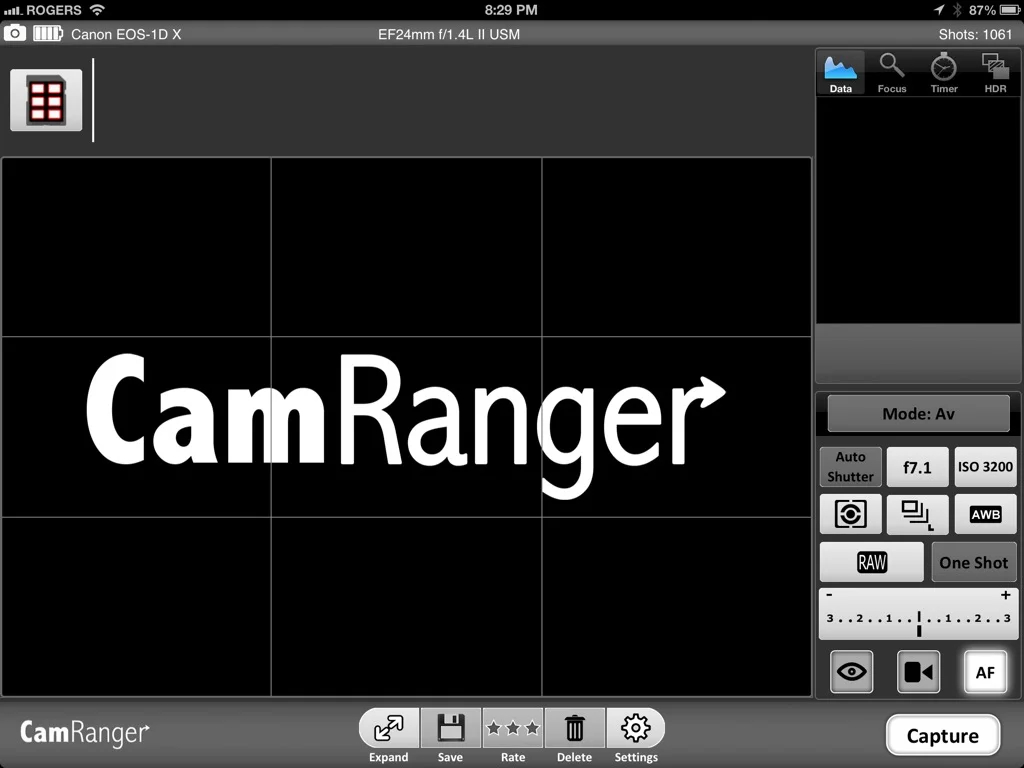
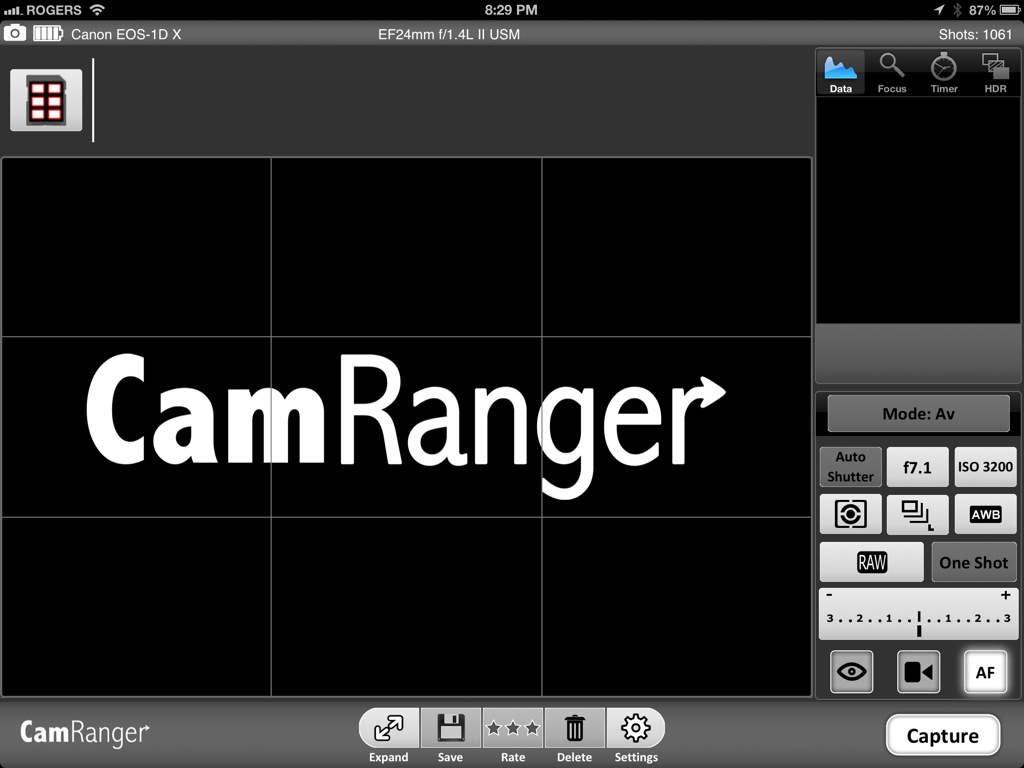
Here's a series of screen grabs from my iPad the night I set the device up the first time.

IMG_0052


Camera is connected to the iPad


Live View and Camera Controls (pls ignore mess)


Ability to download images and check them on the iPad


It's pretty darn simple.  It comes in a little case that can clip to your tripod or camera strap and the USB cable is long enough not to be a pain and not too long that you pull it out of the camera.

In addition to "normal" shots you have great levels of focus control for macro work and even if you want to do focus stacking for combining later in Photoshop.

Android and Windows support are in development now and should be out around the June 2013 timeframe according to the manufacturer.  The manufacturer has a beta client for Mac OSX available for download on their website so yes! wireless tethering to your laptop!

To find out if it works with your camera, follow this link.  The unit retails for $299 USD and as of this writing is not handled by any Canadian retailers but you can get it online from CamRanger direct or from B&H by clicking the link below and helping to support The Photo Video Guy.

New bags from Think Tank specially designed for small DSLR and DSLM cameras!

My friends at Think Tank Photo just announced their first camera bag collection for Mirrorless cameras, the Mirrorless Movers™.  The Mirrorless Movers come in four sizes that range in size from the Mirrorless Mover 5, which fits one small size mirrorless body with a small telephoto or pancake lens attached, up to the Mirrorless Mover 30i, which fits one medium to large size mirrorless body plus two to four lenses and an iPad.

As is their design philosophy, Think Tank placed a premium on quality.  The new bags utilize metal hardware instead of plastic buckles, and only high quality fabrics, YKK zippers and a new, magnetic closure.  In the words of their president and lead designer Doug Murdoch, “The Mirrorless Movers offer photographers quality in their camera bags worthy of their investment in these sophisticated, expensive camera systems.”

The four sizes are:

  • The Mirrorless Mover 5 fits one small size mirrorless body with a small telephoto or pancake lens attached. It is sized for the Canon EOS–M, Leica D–Lux, Nikon 1 series, Olympus E–PM2, E–PL5, EP–3, Panasonic GF3, Sony NEX–C3, or similar sized bodies.
  • The Mirrorless Mover 10 fits one medium size mirrorless body plus one to two lenses and additional accessories. It is sized for the Leica V–Lux, Olympus OM–D E–M5, Panasonic G3, GF5, GH2, Samsung NX5, NX11, NX210, Sony NEX–5, NEX–6, NEX–7, or similar sized/smaller bodies.
  • The Mirrorless Mover 20 fits one medium size mirrorless body plus two to three lenses and additional accessories. It is sized for the Leica V–Lux, Olympus OM–D E–M5, Panasonic G3, GF5, GH2, Samsung NX5, NX11, NX210, Sony NEX–5, NEX–6, NEX–7, or similar sized/smaller bodies.
  • The Mirrorless Mover 30i fits one medium to large size mirrorless body plus two to four lenses, iPad, and additional accessories or a small–size DSLR and one to three small telephoto lenses or primes. It is sized for the Fuji X–Pro 1, Leica M8, Panasonic GH3 or similar sized/smaller bodies. Small DSLRs: Canon Rebel, Nikon D3200/D5200, Sony SLT–A55/A37 or similar sized bodies.

Here's the URL to order your new Think Tank bag directly and help support The Photo Video Guy

http://www.thinktankphoto.com/categories/shoulder-camera-bags/mirrorless-mover.aspx?code=AP-743

REVIEW : The Fuji X-Pro1 - Not getting what the hype is about...

XPro1_Studio_-004920130329-2.jpg

Enough people have been asking me to do an in-dpeth review on the Fuji X-Pro1 that with a long weekend available, and some free time, I arranged with the wonderful Louise Booth of Henry's Cameras in Newmarket to borrow a demonstration unit for this review. I know that some of the requesters were hoping for me to bring my alleged razor tongue to the unit.  Others have challenged my previous assertions about the performance of the autofocus.  Fuji has been a manufacturer of great glass for decades so it was time to give things a shot.  Most of the lenses to fit this camera are primes, but as there was not a prime available to test, I used the 18-55/2.8-4.0 that's often included with the XE-1 although you can certainly get this lens in a kit with the X-Pro1.  So here we go.

Overview
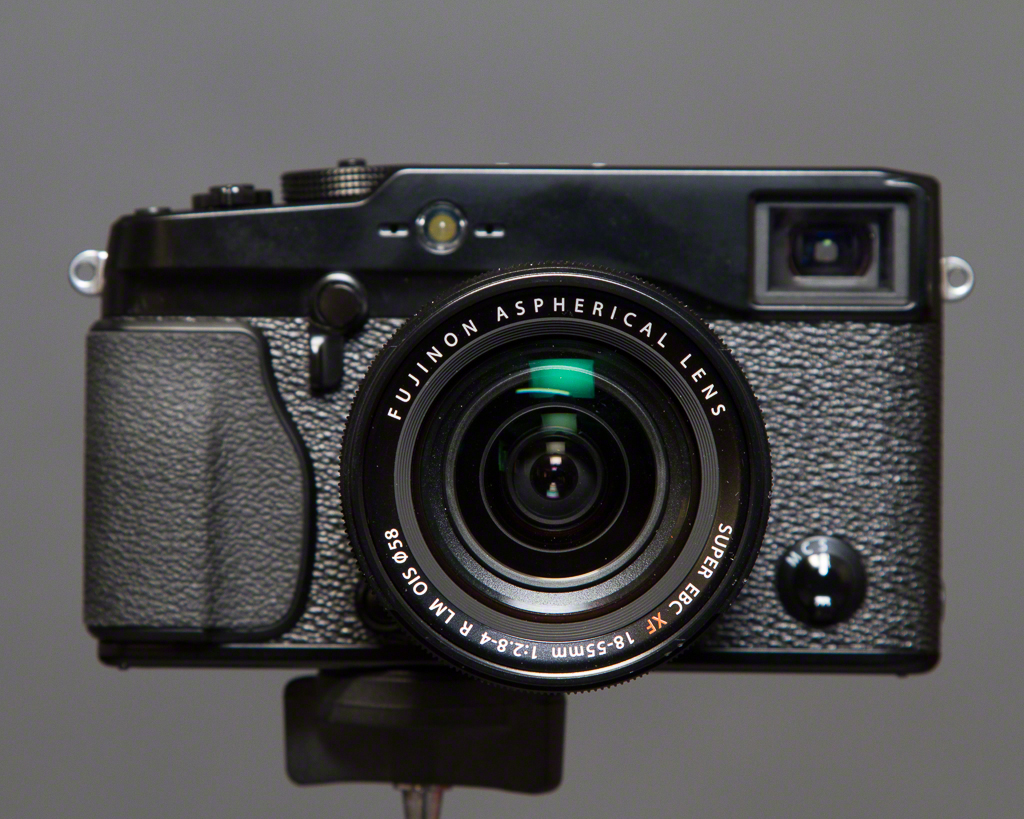
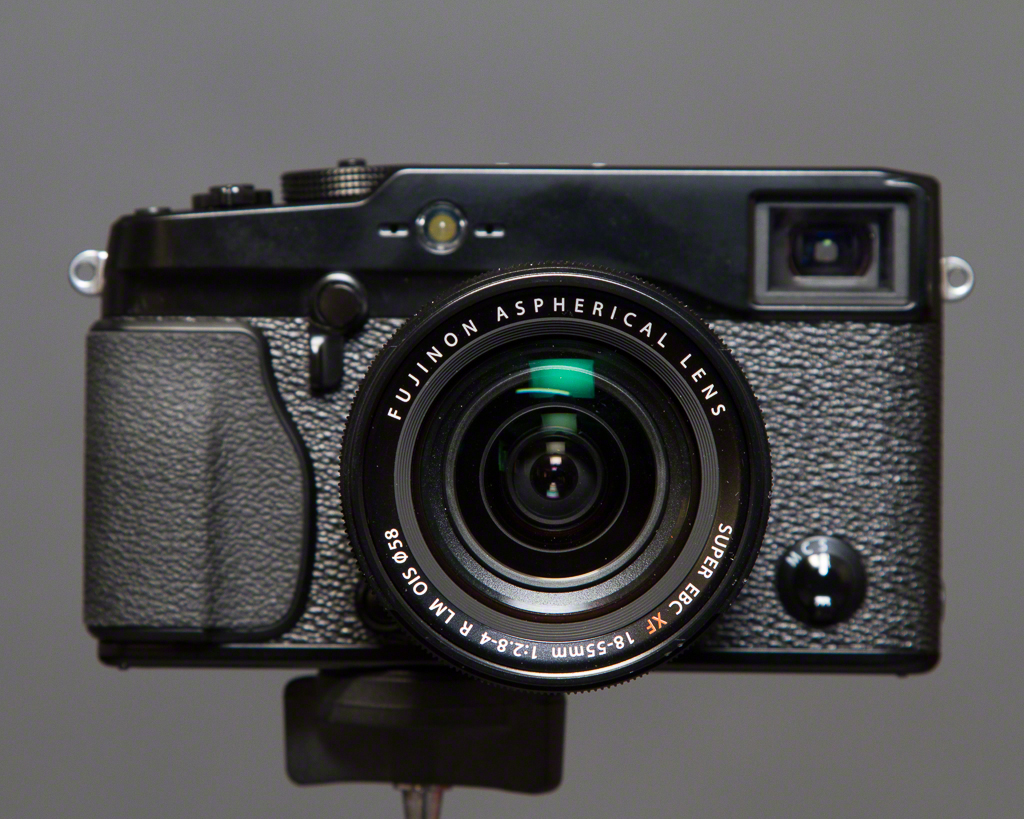
Fujifilm X-Pro1 w 18-55/2.8-4.0 Lens

The X-Pro1 is relatively compact, a bit smaller than a Leica M9 body.  It's very light and there is a finger grip area on the front that makes the camera easy to grip.  It has the common pinhole style strap lugs on the body and unlike the much loved OM-D they don't dig into your hands.  I used a Black Rapid strap attached to the tripod socket instead, more on that later.

The camera uses SD cards, and for my tests I used a Sandisk 32GB Extreme Pro card.  I wanted to use a really fast card because some cameras have been choking on them.  Happy to note no issues with the Fuji.

I only had the one lens for the test so all the sample images are made with the 18-55/2.8-4.0 zoom lens.  Even though it has a nice standard 58mm filter mount, I didn't have one with me so I worked with no filters at all.  The samples were shot in the studio and at the McKenzie Marsh in Aurora Ontario.

I shot everything in RAW that the camera stores as Fuji's proprietary RAF format.  Images were processed in three different RAW converters for reasons to come, specifically Adobe Lightroom 4.4 RC, Capture One 7.1.1 and the Fuji delivered SilkyPix RAW File Converter EX 3.2.12.1

Body

Body layout is decent.  The top controls going from left to right (looking front) starts with a

X-Pro 1 Top View

TTL capable hotshoe in the centre, then the shutter speed dial with A for automatic mode (used for Program and Aperture preferred).  Next up is the shutter release surrounded by a rocker switch to turn the camera on and off.  Far right front is a configureable Fn button and far right back is an exposure compensation dial measured in 1/3 stops from -2 to +2 EV.

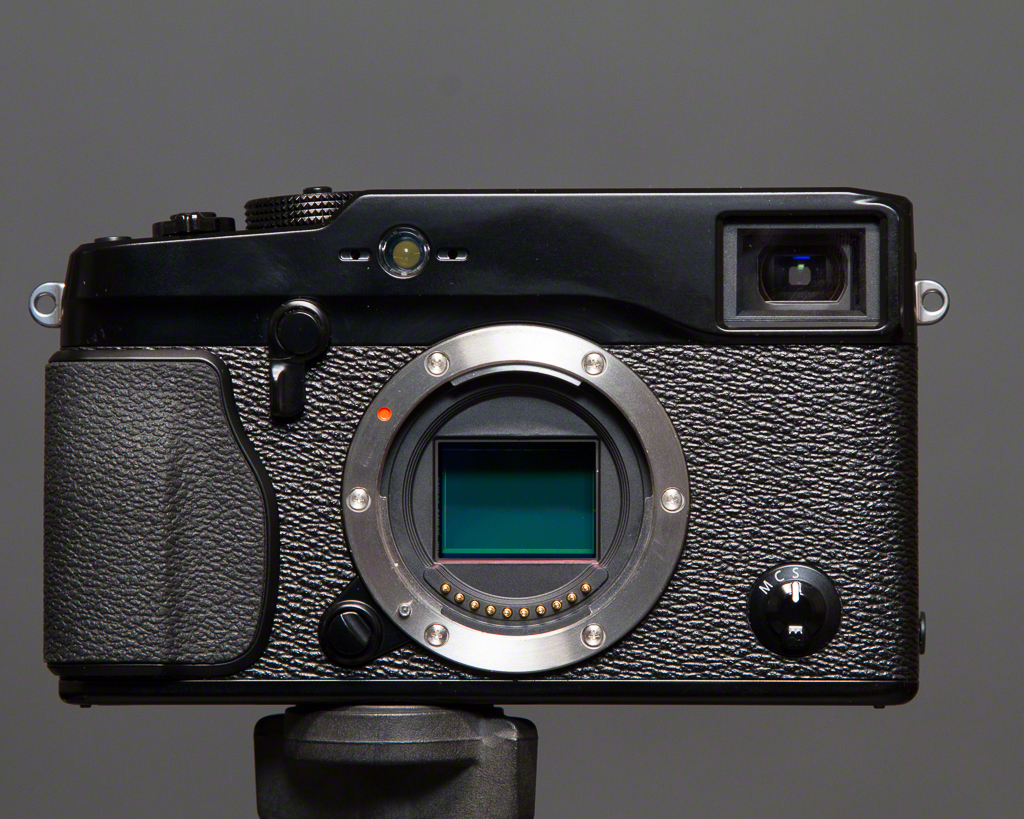
The front has the lens mount, the
X-Pro1 Front View

optical viewfinder and a small switch selecting between single shot, continuous and manual focus.  Just beneath the shutter release is a lever that allows you to choose between the optical viewfinder with bright frame lines like a proper rangefinder, or the electronic viewfinder.  Both have their place.  The optical viewfinder is very real, including the incursion of the lens barrel into the lower right of the view.  The electronic viewfinder is very bright and easy to use.  One of the nice functions of the EVF is that it gives you live exposure simulation when you are using exposure compensation.  As I find exposure compensation is sometimes difficult for new photographers to understand, the simulation really gets the point across quickly.  This function is not unique to the X-Pro1 but is nice to have here.

X-Pro1 Rear View

The rear of the camera has the LCD display, a view mode button, a four way rocker with MENU/OK in the middle and a roller switch.  Down the left of the LCD are Drive, AE and AF buttons that do double duty for zoom and discard in Playback mode.  There is also a DISP/BACK button, a green playback button, a quick menu button to be used with the aforementioned roller switch, and a configureable AE-L/AF-L button.  The top of the 4-way rocker also enables a Macro function.
X-Pro1 Right Side


X-Pro 1 Left Side

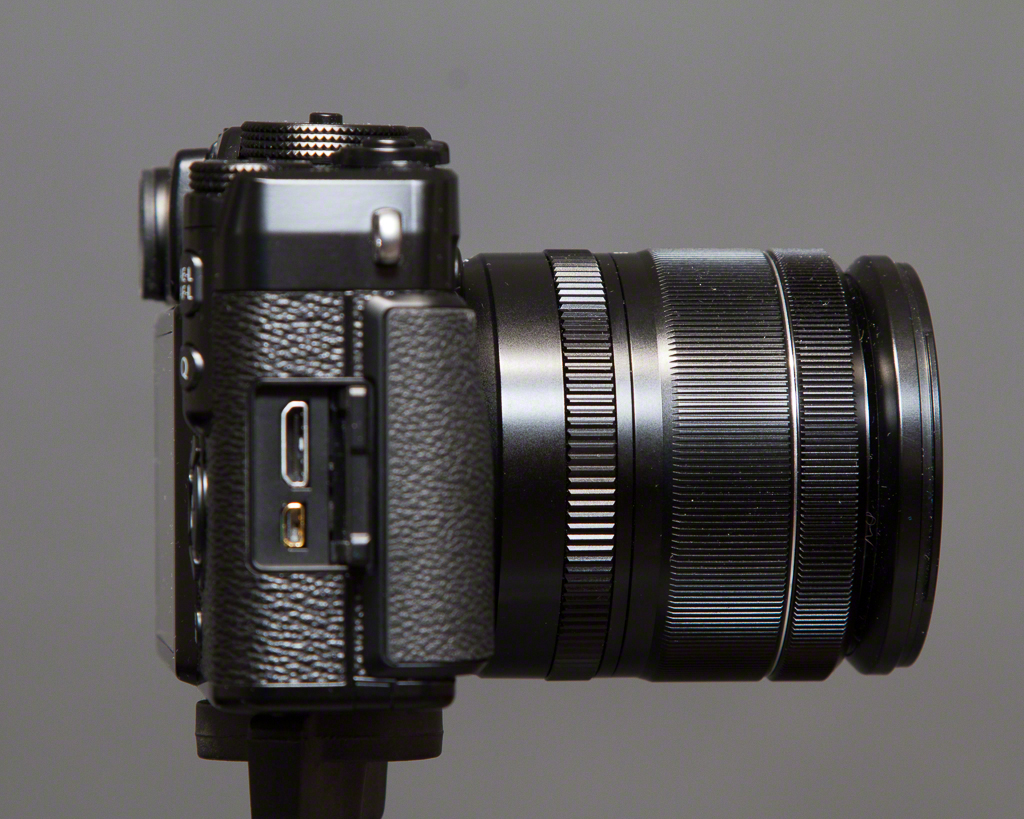
The right side holds the covered USB and HDMI ports.  The left side has a speaker port, and HOORAH! a PC sync port for flash connections.  The bottom plate holds the tripod socket, and a hinged door to access the battery and the SD card.

For the purposes of the review, I updated the firmware on the unit to V 2.0.3 which is current at the time of writing.

Lens

The lens is about the same size as other 18-55 lenses as found on APS-C DSLRs but feels MUCH more solid, mostly due to the fact that metal is involved in the construction.  The zoom ring is wonderfully smooth and sufficiently stiff not to be sloppy.  The lens has a real aperture ring that you actually use to control the aperture in Av and Manual modes.  The lens uses Aspherical elements and of course has Fujinon's EBC (electron beam coating).  The lens accepts a bayonet style hood, but I did not have it for the test.  There is a two position OIS (optical image stabilization) switch for on / off and selector showing a picture of a diaphragm or A that is used for manual or automatic aperture settings.  Put the switch in the diaphragm mode for Av or Manual and in A for Program or Tv operation.

Positives

The fit and feel of the camera is excellent.  It fits the hand really nicely and you can carry it around without developing hand fatigue.  The rubber is grippy and I never felt like I could drop the camera at any instant.

With the new firmware, the autofocus is much snappier than my tests in store when the unit was introduced.  It's still not Sony RX100 or Olympus OM-D E-M5 fast but it's usable, but I wouldn't pick this camera first for fast action.

As noted earlier, the exposure simulation in EVF mode is really useful.  I really like the placement of the exposure compensation dial, although a bit of practice is needed to prevent knocking it into another setting.  The View Mode button chooses between viewfinder, LCD or auto switch mode.  I used it primarily in the last mode and the switch is very quick.  One thing to note is that if the EVF is active, you are going to see the review image in the EVF, so if you have the habit of looking to the LCD to chimp, it doesn't work that way.  If the viewfinder is in optical mode, the LCD behaves "normally" in review mode.

I found the placement of the AE-L/AF-L button sort of handy but it's a bit of a dance to lock the exposure with the button and lock the focus with a half-press of the shutter.  The AE bracketing function is quite good once you find it in the long menu list, and you can hold the shutter down in this mode to burst brackets handheld.  I also found the Dynamic Range bracketing to be interesting but not really making of a big difference in real world use.

Negatives

I shoot left eyed, which to get a full view presses the tip of my nose against the LCD.  I do not have a large nose and I would feel for a left eyed person who does.  The LCD is a giant nose grease trap and users should have a micro-fibre cloth handy at all times because grease sticks to the LCD with terrifying efficiency.  If I owned the camera, I'd put a Zagg protector on the glass immediately so I could clean the LCD easily.  The auto switch sensor prevents the use of an eyecup so this is a real nuisance to me.

The tripod socket is in a really lousy place.  If you use a strap that connects to the socket, or like to have a quick release plate on your camera, know right away that anything in the socket is going to impede the opening of the battery door preventing simple access to the battery and the SD card.  Given that I use L plates on everything, this is a major PITA to me and I want to smack the designer that approved this with a large dead fish.

The Q button is mostly useful, not that you can easily figure out how to manipulate it without futzing around or cracking the manual, and if you have reasonably sized hands, get used to hitting it regularly, even when you don't want to.  In general the labelling is rarely clear and needs some User Interface smarts applied to it before the next version.

I dislike having to move two different switch settings to switch between modes.  This is just nuisance value.

Fuji has taken a lot of flack for its menus.  I'm going to say that the menu layout is crap and couldn't get to useful with turn by turn directions and prepaid bus ticket.  Particularly annoying is the Drive menu that was plainly designed by someone who has never dealt with a multi-variable menu selection system before.

I tend to leave my cameras in low speed burst mode.  Not this one.  It bursts like a flea on speed if you go near the button.  I ended up with 3-6 shots regularly with a simple button press and as the camera is to its credit very quiet, you could fill a card and not know why until it's too late.

If I want film emulation, I will do that in post.  Unfortunately even in RAW mode, it looks like you are still getting film emulation because Std mode is Fuji Provia.  I don't know if you are getting film emulation but I think you might be based on EXIF data reported by Capture One.  If you can turn this off, I could not find it.  If you can't turn it off, wake the frak up Fuji because not everyone wants the look of your old film.  If you can turn it off, make it clear that it's OFF.

Processing Images

Fuji made big hay about their X-Trans sensor that forgoes the well known and accepted Bayer filter layout.  Unfortunately this means that RAW processing is still a complete train wreck.  I know people who only shoot in JPEG because the RAW conversion sucks and blows simultaneously but I don't find it acceptable to spend this kind of money and have to throw 30% of your bits away just to get a viewable image.  Apple's OS X Camera RAW doesn't work with RAF files.  Lightroom 4.4 RC has a RAW converter for RAF but many reviewers have said it's not very good.  I agree.  I also tried Capture One's new X-Trans RAW converter and it looks a LOT like the Adobe one.  Because I like pain, I also tried the SilkyPix Raw Converter EX.  To call this software a piece of shit insults shit everywhere.

Why am I so negative about the RAWs?  Because if use a 3:1 zoom ratio I can see little rectangles in the images!  If I do this with other RAWs, they may not be razor sharp but they are not obviously pixellated.  I did a direct comparison between images shot with Canon's 18-55 for the EOS-M and the Fuji 18-55 on the X-Pro1.  The levels of sharpness, noise and pixellation are dramatically worse on the Fuji, so much so that this one thing fires up the Danger Will Robinson alert system.

Conclusion

Great fit and feel in a rangefinder style camera.  Great build quality in the lens tested.  Reasonably quick auto-focus and accurate exposure control.  Some wonderful control layouts, compromised by lousy menu structures.  Bad placement of the tripod socket gets in the way of access to the battery and SD card slot.  I cannot tell if the X-Trans sensor is any good because the RAW converters create uniformly choppy images.  They might be doing the job extraordinarily well in which case the X-Trans is an epic fail.  It's also possible that I got a bad version of the camera.  Maybe 2.0.3 is not good firmware.  I don't know, but based on the real world testing, I would not spend the money on this thing.  It would be fine at half the price, but for the kind of money involved, I'd much rather get an OM-D E-M5 because it kicks the X-Pro1's ass down the block and around the corner.

Sample Images
Click this link to go to the sample gallery.  All images are straight RAW conversions unless otherwise documented.

Specifications (provided courtesy of Fujifilm Canada)

Model Name FUJIFILM X-Pro1
Number of effective pixels 16.3 million pixels
Image Sensor 23.6 mm x 15.6 mm (APS-C) X-Trans CMOS with primary colour filter
Dust reduction system
Ultra Sonic Vibration
Storage Media SD memory card / SDHC memory card / SDXC (UHS-I) memory card*1
File Format
Still Image
JPEG (Exif Ver 2.3)*2, RAW (RAF format), RAW+JPEG (Design rule for Camera File system compliant / DPOF-compatible)
Movie
H.264 (MOV) with Stereo sound
Number of recorded pixels L : (3:2) 4896 x 3264 / (16:9) 4896 x 2760 / (1:1) 3264 x 3264 M : (3:2) 3456 x 2304 / (16:9) 3456 x 1944 / (1:1) 2304 x 2304 S : (3:2) 2496 x 1664 / (16:9) 2496 x 1408 / (1:1) 1664 x 1664<Motion Panorama> L  Vertical: 7680 x 1440 Horizontal: 7680 x 1440 M  Vertical: 5120 x 1440 Horizontal: 5120 x 1440
Lens Mount FUJIFILM X mount
Compatible Lens
  • Interchangeable lens FUJINON LENS XF18mmF2 R
  • Interchangeable lens FUJINON LENS XF35mmF1.4 R
  • Interchangeable lens FUJINON LENS XF60mmF2.4 R Macro
Sensitivity Equivalent to ISO 200 - 6400 (Standard Output Sensitivity) AUTO mode : AUTO (400) / AUTO (800) / AUTO (1600) / AUTO (3200) Extended output sensitivity equivalent ISO 100, 12800 and 25600
Exposure Control TTL 256-zones metering, Multi / Spot / Average
Exposure Mode Programmed AE, Shutter priority AE, Aperture priority AE, Manual exposure
Exposure Compensation -2.0 EV - +2.0 EV, increments with 1/3 EV step
Shutter Control Focal Plane Shutter
Shutter Speed (with mechanical shutter) (AUTO mode) 1/4 sec. to 1/4000 sec., (All other modes) 30 sec. to 1/4000 sec. Bulb (max. 60 min.) Time 1/2 to 30 sec.
Continuous Shooting Max 6 / 3 fps selectable
Auto Bracketing AE Bracketing (±1/3 EV, ±2/3 EV, ±1 EV) Film Simulation Bracketing (Any 3 type of film simulation selectable) Dynamic Range Bracketing (100%, 200%, 400%) ISO sensitivity Bracketing (±1/3 EV, ±2/3 EV, ±1 EV)
Focus
mode
Single AF / Continuous AF / MF Distance Indicator
type
TTL contrast AF, AF assist illuminator available
AF frame selection
Area (EVF / LCD: 49 areas with 7 x 7, OVF: 25 areas with 5 x 5) / Multi * changeable size of AF frame: among 5 type
White Balance Automatic scene recognition Custom, Colour temperature selection (K) Preset: Fine, Shade, Fluorescent light (Daylight), Fluorescent light (Warm White), Fluorescent light (Cool White), Incandescent light, underwater
Film Simulation Mode 10 type (PROVIA/STD, Velvia/VIVID, ASTIA/SOFT, Pro Neg H, Pro Neg S, B/W, B/W+Ye filter, B/W+R filter, B/W+filter, SEPIA)
Dynamic Range Setting AUTO (100-400%), 100%, 200%, 400%
Self-timer Approx. 10 sec. / 2 sec. Delay
Flash Modes Hot shoe with TTL contacts; sync terminal Red-eye removal OFF: Auto, Forced Flash, Suppressed Flash, Slow Synchro, Rear-curtain Synchro. Red-eye removal ON: Red-eye Reduction Auto, Red-eye Reduction & Forced Flash, Suppressed Flash, Red-eye Reduction & Slow Synchro, Red-eye Reduction & Rear-curtain Synchro.
Hot Shoe Yes (dedicated TTL Flash compatible)
Flash Synchro Terminal X terminal, synchronized Shutter speed: 1/180 sec or slower
Viewfinder
Hybrid Multi Viewfinder
Optical viewfinder
Reverse Galilean viewfinder with electronic bright frame display Magnifications: 0.37x / 0.6x Coverage of frame area v.s. capturing area: approx. 90%
Electronic viewfinder
0.47-in., approx. 1,440,000-dots colour LCD viewfinder Coverage of viewing area v.s capturing area: approx. 100%
Eye sensor installed
Eye point:
approx. 14 mm
LCD Monitor 3.0-inch RGBW (White) LCD monitor, approx. 1,230,000 dots, (Approx. 100% coverage)
Movie Recording 1920 x 1080 pixels, 1280 x 720 pixels (24 frames/sec.) with stereo sound Individual movies can not exceed 29 minutes in length.
Photography Functions Select custom setting, Motion panorama, Colour space, Colour (Saturation), sharpness, Dynamic range, Film simulation, Gradation, Auto red-eye removal, Framing guideline, Frame No. memory, Histogram display, Preview depth of focus, Focus check, Electronic level, Multiple exposure, Date input, Fn button setting (One-touch RAW, Movie, etc)
Playback Functions RAW conversion, Image rotate, Red-eye reduction, Photobook assist, Erase selected frames, image search, Multi-frame playback (with micro thumbnail), Slide show, Mark for upload, Protect, Crop, Resize, Panorama, Favorites
Other Functions PictBridge, Exif Print, Languages selection, Time difference, Quick start mode, Power save mode, Silent mode
Terminal
Video output
-
Digital interface
USB 2.0 High-Speed
HDMI output
HDMI mini connector
Power Supply NP-W126 Li-ion battery (included)
Dimensions 139.5 (W) x 81.8 (H) x 42.5 (D) mm / 5.5 (W) x 3.2 (H) x 1.7 (D) in. (Minimum depth: 34.1 mm / 1.3 in.)
Weight Approx. 450 g / 15.9 oz. (including battery and memory card) Approx. 400 g / 14.1 oz. (excluding battery and memory card)
Operating Temperature 0°C - 40°C
Operating Humidity 10 - 80% (no condensation)
Guide to the number of available frames for battery operation approx 300 frames
Starting up period -
Accessories Included Li-ion battery NP-W126 Battery charger BC-W126 Shoulder strap USB cable Body cap Metal strap clip Protective cover Clip attaching tool CD-ROM (Viewer software, RAW File Converter etc. *3) Owner's manual
Optional Accessories Li-ion battery NP-W126 Battery charger BC-W126 Shoe Mount Flash EF-20, EF-42, EF-X20 Interchangeable lens FUJINON LENS XF18mmF2 R Interchangeable lens FUJINON LENS XF35mmF1.4 R Interchangeable lens FUJINON LENS XF60mmF2.4 R Macro Protector Filter PRF-52 52 mm Φ Protector Filter PRF-39 39 mm Φ Hand Grip HG-XPro1 Leather Case LC-XPro1 * The lens of focal length at 35 mm or less can be placed in this leather case with the camera X-Pro1.

Sample Images
Quick Look : Blackmagic Cinema Camera

blackmagiccinemacamera.jpg

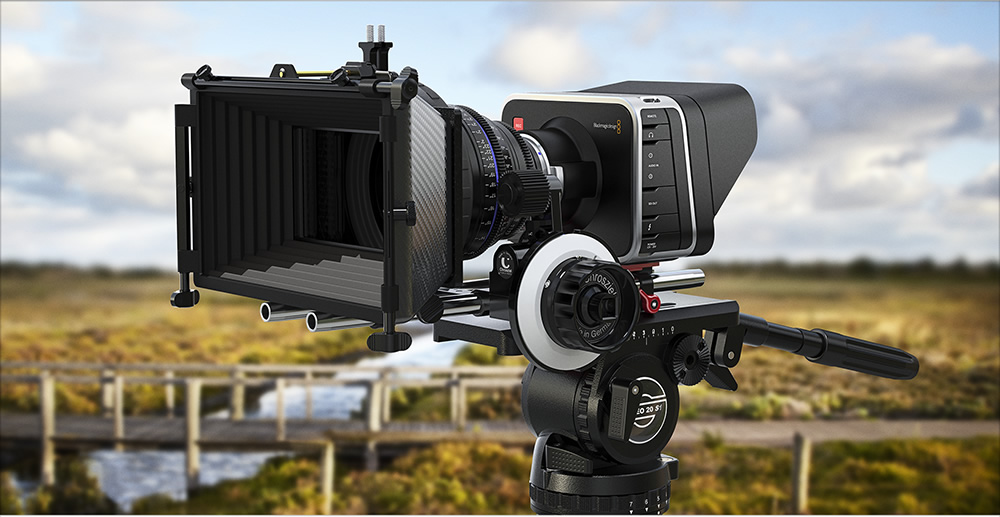
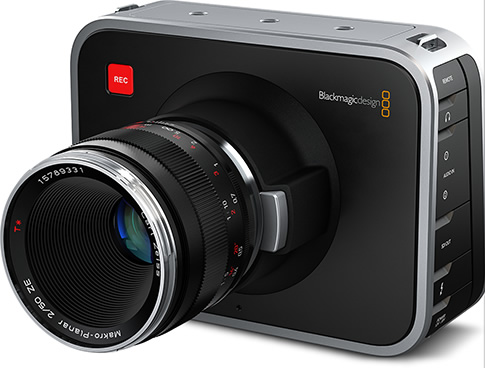
Inspiration for this post comes from NCC member Eden.  Eden is making a number of short films, shooting on a Canon 60D and asked the other night about the Blackmagic Cinema Camera.  My knowledge was not really sufficient so I spent time digging into the product to produce this quick look. blackmagiccinemacameraThe Blackmagic Cinema Camera is designed from the ground up for video.  It's architects have built a product for commercials, episodic television, documentary work and feature film creation.  Blackmagic has great street creds in the areas of digital production.  Indeed they make many products that make getting to video simpler for people of all skill levels.

bccelegantThe camera is a compact device taking interchangeable lenses.  There are two models, the Blackmagic Cinema Camera EF and the Blackmagic Cinema Camera MFT.  The EF takes Canon EF and Zeiss ZE cinema lenses and the MFT takes passive micro four-thirds lenses.  PL lenses can be mounted to the MFT using a third party adapter.

Cinema lenses are different architecturally than still lenses, they are built for cinema film work and excel in this space.  Canon's recent foray has brought their C series of cinema cameras as a competitive offering in addition to RED and to Sony.

bccversatile

The Blackmagic Cinema Camera is unique in its price point of under $3000 USD for the body.  That is substantially less than its erstwhile competitors.  It is compact and effectively sized and doesn't look like a classic cinema camera.  As you can see from the pictures herein, it looks like a simple box with a display on the back.

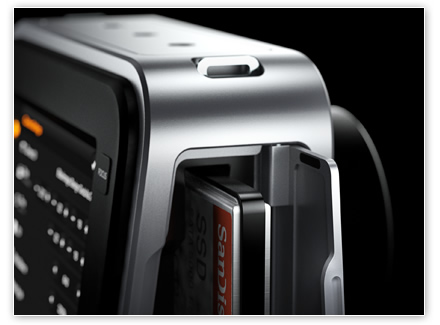
bccssdThe camera houses a 2.5K sensor capable of capturing 12bit RAW footage.  In this format about 30 minutes of 24p video can be captured on a 256GB SSD.  The camera also natively supports Apple ProRes and Avid DNxHD at 1920x1080 pixel resolution.  This means direct interaction with popular Non-Linear Editing systems without the need to transcode, a significant time and quality saving.  Storage is on removeable 2.5" SSD drives.  This is a very innovative approach as it provides the filmmaker great flexibility and huge storage performance opportunity.  Drives can be prepared (formatted) native with Mac OS X or with third party formatting tools for Windows.

One of the real hallmarks of the camera is that it has 13 stops of dynamic range, far superior to that found on still cameras used for video capture which top at 6 stops in good examples.  Focus is manual but focus peaking is built-in to obtain precise focus and an auto Iris button is provided to control the iris to prevent clipping.

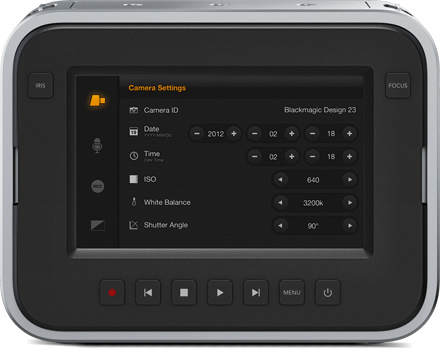
bcctouchscreenThe integrated display is 5" diagonally and offers 800x480 pixel density.  It is a capacitative touchscreen design maximizing camera rear real estate.  The display can also be used to add metadata in the field, to make annotations and notes, and to otherwise keep your footage organized as you capture it.

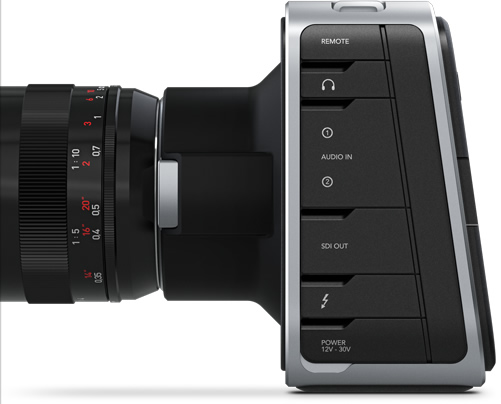
Connection to the computer is via Thunderbolt so extremely fast file movement is available. There is 10bit SDI video out in 4:2:2 and 4 channel SDI-HD bccconnectionsaudio out.  The camera has two 1/4" balanced inputs switchable for mic or line level input.  There is also a built in mono mic and mono speaker for monitoring capabiility.  There is a standard 2.5mm LANC jack for connecting a remote.

The camera follows industry standards offering 48khz 24 bit audio and SMPTE 292M video.

The camera is capable of running for 90 minutes on a fully charged battery, with recharging time taking about two hours.  The camera includes an AC supply and there is a port for external battery packs as well.

bccdavinciresolve bccultrascopeIn addition to the turret cap, sun shield and strap, the camera includes DaVinci Resolve full license software for Mac or Windows and includes the dongle.  Media Express software is included for video capture via the Thunderbolt port.  Blackmagic also includes their Ultrascope software for waveform monitoring via the Thunderbolt port.

All in all, it's extremely impressive.  Yes you will need to buy glass in addition to the camera, and you had better have a computer handy, and yes you will probably want to be a Mac user.

Full specs can be found here.

OPINION : Non-linear Video Editing

I never learned iMovie or Elements or any of the simple to use video editors.  I learned on Final Cut Studio, a monster application with incredible power and a definite learning curve.  I got to a level of not completely dangerous competence.  Then Apple released Final Cut Pro X.  Apparently iMovie users loved it.  I found the transition somewhat difficult and certainly real Professionals had issues with FCP X.  Apple has enhanced the product since release and added in many of the missings that were in Studio and not in X. FCP X works fine and is definitely priced competitively and the Motion application at $50 is a stunning buy.  Regardless, I was regularly frustrated by two things.  If I shot anything on a Canon digital camcorder it had to use this dumb transcode thing just to get the media into a project and then when I was finished, compressing and exporting video was a pain in the butt, many of the direct uploads did not work properly and the encode took a LONG time.

So I was looking around www.lynda.com one day and saw a class by video guru Rich Harrington on moving to Adobe Premiere Pro for Final Cut users.  Mr. Harrington has forgotten more about video editing than I will likely ever know but his teaching style is easy to follow and I worked through the training and was very impressed.  To me, it looked like Premiere Pro had the same kind of structure as Final Cut Pro Studio from an editing perspective.

Since I owned the Master Edition of the Creative Suite (for other reasons) I already had Premiere Pro so I thought I would give it a shot.  It has a learning curve, like any serious product but having the background of sorts in older non-linear editors it wasn't all that hard.  I also took the Lynda class on Premiere Pro with Abby Shapiro, the instructor I had learned Final Cut Studio from.

Usability is incredible and I'm sure I have not even scratched the surface of the product.  What I know is that editing video and audio is straight-forward for me and performing corrections and adding effects is dead simple.  Adding credit rolls and title sequences and lower thirds is very simple.  As with FCP X there are a number of templates included and veritable slew of external offerings available on the web.

What really sets Premiere Pro ahead for me is how it leverages my hardware for high performance.  FCP X could use my Matrox Mini video coprocessor, some of the time, but it didn't seem to add much in the way of performance.  Premiere Pro sees the Matrox automatically and easily leverages the Matrox assisted compression algorithms.  This was like pulling teeth in FCP X.  There was also no real consumption of the GPU in the Mac Pro that I could see.  I recently changed out the ATI 5870 in the the Mac Pro for an nVidia GTX 680 (it works fine with 10.8.x but no boot screen) and I changed a couple of text files in the config and now Adobe's Mercury engine fully leverages that stack of Cuda cores in the GPU.

I also found that the Import in Premiere Pro was instant.  No transcoding or modifications required.  Massive time saver.  Once the editing is done, I select Export, pick the compression type and hit Queue.  The export job goes directly into Adobe Media Encoder and it really screams along.  This is so much more reliable and so much faster than the FCP X or Compressor alternatives that to a working pro, the time savings would pay the price difference in no time at all.

I am not a professional video editor.  Premiere Pro rocks it for me.  I am told that the current release of Premiere Elements is also very quick and very easy, an improvement over prior versions.  I have no personal experience with it but if as rumour has it, Elements contains a lot of the functionality of the Pro release, it might do the job for you.  I'm going to stick with Premiere Pro.

Now to learn enough After Effects so what I make doesn't suck enormously.

The World's Worst Full Frame Sensor?

Recently the folks at DxO released their assessment of the Kodak CCD sensor in the Leica M9, M9-P and ME.  They called it the worst full frame sensor in the world.  Thus Leica fans developed apoplexy and Leica haters took to the internets for group slamming. I own and M9.  It's a freaking awesome camera.  The camera is more than the sensor.  It's the size, the feel, the glass, and the images.  It's not terrific at high ISO, it has no video (YAY!) and it's a CCD.  That and something on the order of a ten spot will buy you some frappy drink at Starbucks.

Why is the DxO review irrelevant?  Because there was no lens involved in the test.  Right.  The tests are mathematical, not image oriented.  How one can offer a qualified report on a camera sensor without using it as a camera, sounds about as likely as oh say, political integrity.  The review also doesn't take into account that the sensor was developed specifically by Kodak to capture the light from a small lens on a large sensor.  As Steve Huff points out, no Kodak sensor, no digital Leicas.

Be that as it may, my Leica is wonderful.  There are things it doesn't do well, and there are things it does better than anything else.  Let's focus on the photography and not the engineering reviews, what do you say?

Tips to Make Better Images : Calibrate Your Monitor

CMUNSML_M1.jpg

As digital photographers, we have the luxury of having complete control of the digital darkroom.  We have not always had this, but with great power comes great responsibility.  (with apologies to Stan Lee and John Romita Jr.) Your responsibility?  Make sure that BEFORE you start working in the digital darkroom, make sure your tools are not lying to you.

Here's a secret.  Unless the magical unicorns of editing sit on your shoulder, your monitor is wrong.  If you are still using a CRT, don't spend money on a calibrator, go buy a decent IPS display and come back after you've done that.

IPS or In Plane Switching displays are a great place to start with for a display.  But maybe you have a general LCD, or LED powered LCD or a laptop display.  Then by default you are seeing issues.  Most all monitors these days have the ability to change their brightness automatically.  Good for word processing and browsing, bad for editing.  Most all monitors come set from the factory to eyeball stunning brightness, crushed gamma and high contrast.  Why?  So they look "better" on the wall in the retail store.  It's just like a TV.  If you bought your TV at a big box store, it was on display in "demo" or "vivid" or "retina burn" mode.  You get it home, turn it on and it hurts.  If you play games on your computer, many games "reconfigure" your display for brightness and contrast, or to make the dark scenery legible so the monster doesn't eat your face, you turn the display way up.

Enough kvetching on my part.  A display calibrator reads the display, measures the display capabilities and produces a display profile called a display ICC.  These are just like a printer / paper ICC file but for your display.  There are lots of vendors out there doing this with the best known being the Datacolor Spyder, the Huey and the X-Rite Colormunki.

CMUNSML_M1I have owned all three.  The Huey was incredibly inconsistent.  Software updates were rare and doing multiple monitors cost extra.  Bad - do not buy.  Until the release of the Spyder 4 Elite (and only that model), the calibrations were never consistent and Datacolor's software is still serialized to a single computer.  Bad choice - do not buy.  The Colormunki line consisting of the Photo, the iDisplay, the Display and now the Smile are easy to use, have great software, are fast and consistent.  The Smile is new and sells for about $120.  If you don't need to profile printers or paper or projectors, buy the Smile, keep the rest of your money in your pocket and get to the calibrating.

I've spoken about calibration on the TV show and at meetings of the Newmarket Camera Club.  A very seasoned member, who has developed a healthy cynicism about tech sent me this email the afternoon after he bought a Smile.

"Ross,

I did the calibrations on my three monitors......quite a difference..
I also took it to work and let the Publication Dept do their monitors.
They now know why the publications look bad.
All of their monitors were way off.
I'd recommed this to anyone who wants to look at real colour on their montors."
The deal was that if he did not see a difference in his displays after calibration, he would return the device, no questions asked.  He's not returning the Colormunki Smile, and I expect the production department at his place of work will be buying their own as well.
Calibration isn't perfect and you should be recalibrating your displays regularly.  I do mine every two weeks.  Since the process takes all of five minutes, it's no problem at all.  If you aren't happy with your edited work not looking the same on paper or on the web, or you do all kinds of editing work on your machine and it then looks like cat yak on a different machine, your monitor is in need of caibration.  Save time, save headaches, save frustration, get a display calibrator and if you want it good, fast and inexpensive go directly to the Colormunki system.

Tips to Make Better Images : Black and White Processing and the Use of Filters

It appears I start many tips the same way, so in keeping some consistency... Back in the days of film...

Happy now?

Black and white processing for digital images has come a long way from the horrible B&W converters of old or just dragging all the saturation away in a colour image to make a black and white one.

We now have superior post processing tools designed specifically for the creation of black and white images.  The two that I am inclined to recommend are Nik Softwares Silver Efex Pro 2 and OnOne Softwares Perfect B&W.

Both products offer a number of really well done presets that could be the end or the beginning of your black and white creations.  The primary thoughts that go into black and white digital processing are a) maximizing the dynamic range of the exposure and b) getting the contrast to the right levels to facilitate story creation.  By removing colour, the viewer must become more engaged in the story making process and so our artistic intent has more power, given that the pretty colours are stripped away.  Think of the multiple fall leaves images or sunsets you have seen and think of what story they initiate if devoid of colour.

One of the lesser used functions in black and white digital processing is the use of coloured filters.  When we shot B&W film, we carried an assortment of coloured filters that by filtering out their own colour, would change the look of the black and white image, sometimes substantially, to help create the storyboard.  With digital processing you dont need to carry sleeves of filters for b&w anymore although you can if you wish.  Its just a lot easier to do this in post.  Lets take a look at the effects of some of these filters.  Note that most of the these filters can be applied in post processing, but two of them, the Neutral Density and the Polarizer are only effective when used at time of Image Capture.

Yellow

When I started shooting film, one of my mentors at this time, an awesome fellow by name of Jim Brotchie, told me to go out and get a Yellow filter and put it on the lens ALL THE TIME when shooting b&w.  He convinced me to set an adjustment on my handheld meter (my camera at the time had no internal meter) to compensate for the light loss when shooting with the (Y2) filter.  Yellow filters reduce the yellow and so enhance blues and improve contrast overall.  You do have to watch that they dont increase the visibility of human blemishes too much but the effect is nearly always an improvement.  If you dont know where to start when processing b&w images, try adding a yellow filter first.

Orange

Go figure that an orange filter is like a yellow filter only stronger.  The same guidelines apply, but you have to be more careful with reddish subject matter going lighter.  This filter is very useful for b&w images of fall colours since it lightens oranges and reds while darkening greens and blues.  Some really stunning images of Chicago blues musicians with very dark chocolate skin had beautiful contrast and texture appear, when an orange filter was applied.

Red

Red filters were most commonly used with the old infrared films, but work very well on some landscapes as they deepen the blue of skies and make reds nearly white so you can get very interesting juxtapositions with red leaves and blue skies.  Whites, greys and blacks transit mostly unchanged so you can really make outdoor images pop.  Red filters for people produce a very pale skin on caucasian people and whiten reddish areas like lips and blemishes.  For the most part a red filter is not optimal for human beings.

Light Blue

A light blue filter makes blues light and darkens reds.  So not particularly optimal for landscape work but wonderful to soften blemishes and to create contrast between skin and lips on light skinned people.  Pretty much the go to filter for b&w images of women.  Use caution because very bright blue eyes can take on a possessed look.

Dark Blue

Not really useful as they tend to block up contrast heavily and darken most colours.  Try as an experiment but not a filter you are going to use a lot.

Green

Greens will lighten foliage and may increase contrast in clouds.  Some people like the effect on skin in portraits.  Again something to experiment with, but certainly not a go-to filter for black and white.

Neutral Density

We know what ND filters do.  They reduce the light transmitted to the sensor.  This allows us to slow shutter speeds or increase the aperture size for creative effect.  These filters should be in every photographer's kit and are one of the two that you really need to be using at time of capture.

Polarizer

The Polarizer is most often considered to deepen blue skies or to remove reflections in colour photography.  It adds the same value to a B&W image so if the plan is to go make images that will be B&W processed, use the Polarizer for the same reasons you would for colour.  The Polarizer must be a real filter and is used at time of capture.  Polarizer effects in post processing or for the most part, lousy.

Tips to Make Better Images : Choosing the Right Lens

All too often we look at adding lenses to our kit, and when we enter the camera store or go online, we are directed to a particular brand or range.  Back in the days of film, zoom lenses were growing in popularity but it was acknowledged that they were a compromise, more flexible than a fixed focal length lens (what we now call primes), but never as sharp or as contrasty, or as bright.  Photographers made the hard decision to go zoom or prime, and serious shooters often had zooms that overlapped the primes.
Today lens technology has changed dramatically.  We no longer have to pay thousands and thousands of dollars for lenses with extra low dispersion glass, or apochromatic elements.  Multicoatings that actually do the job are no longer solely the province of the camera manufacturers, or as it was then, the glass manufacturers.
However, one size RARELY fits all and I am seeing an increase in the number of vendors pushing the one size fits all lens.  While I don't dispute that the very expensive Nikon and Canon 28-300 variants are quite good, we pay a price for their flexibility still.  And when we look to the non- L Canons and the non-FX Nikons as well as pretty much all of the third parties we are giving up even more.
Theres an old saying that you can have any two of good, fast and cheap, and this applies to lenses to some extent although fast and cheap is hard to find outside of the 50/1.8 sub $200 offerings.  Before you run out and buy the kit zoom or that new exciting 18-270 take some time to consider your own needs, not what the seller wants you to buy.
Wide to tele lenses are ALWAYS compromises.  They all vignette in the corners when wide open, and all display some level of barrel distortion at the wide end and pincushion distortion at the tele end.  My friends Quyen, Bryan and I have done eye level tests and there are lenses on the market where the distortion is not just there, it's so obviously there, that potential buyers should run, not walk, from those lenses.
We also find that the wider the zoom range, the slower the lens is.  By this I mean that it has a relatively small maximum aperture and one that varies depending on the focal length selected.  Have you ever noticed that top line lienses have the same aperture through the zoom range while consumer grade range from 3.5-6.7 and beyond?
I also see a significant shift away from using a flash.  Since our default lenses are slower optically and people dont want to use flash, even though flash has never been better than it is today, how can they make successful images in low light?  There are only two options, slow shutter speeds, or pumping up the ISO.
Certainly film never had the ISO range of today's digital cameras that can produce decent results up to ISO 3200 in most cases.  But do an experiment and take the same shot on a tripod at ISO 200 and ISO 3200.  The difference in image quality is enormous.  Colour saturation, contrast and digital noise are very different.  As we push the ISO higher we give up saturation and contrast in exchange for noise..  If we go to slow shutter speeds we need a tripod and may still get motion blur if the subject moves.
Fast lenses, those with larger maximum apertures cost more.  People keep cameras between three and five years, but often keep the glass much longer.  Should you not consider having fewer lenses that are faster, or consider zooming with your feet instead of zooming in the lens?  The wide range zooms make great snapshots, but I consistently see that the best work of photographers is captured with primes or with the top of line zooms.
It's your call, but do think about what you want out of the photographs you will make.  That will define the route to follow for glass.

Tips to Make Better Photos : Buying the RIGHT Macro Lens

I met a lovely lady on Sunday.  She is relatively fresh into the field of serious photography and was being frustrated in her efforts to get effective shots of coins without harsh shadows and full sharpness. She had gone into a camera store and the very helpful sales person suggested the Nikon 40mm Micro.  This is a fine lens and very inexpensive.  Unfortunately, it's a TERRIBLE choice for close up work.

While the lens is quite sharp and has a great aperture range to ensure depth of field, the idea of a macro (or as Nikon calls them - Micro) lens is to get lifesize captures.  Simply this means that if you have a full frame sensor measuring 24mm x 36mm, you can get sufficient closeness to capture a subject that is 24mm x 36mm on the sensor.  This is what the marketing people mean when they hurl 1:1 around in their documentation.

The challenge is how physically close you have to get as the photographer to get that 1:1 image.  The shorter the focal length, the physically closer you can get.  Sounds good, right?

Nope.  The closer you must physically be, the greater the probability that you will become an impediment to getting a good image.  If your subject is alive, you crowding in may cause it to leave.  Or bite you.  If your subject is static, you might end up blocking most or all of the light you need.

So, you may be thinking, ok smart guy, what does work?  100mm or longer.  That's it.  Start there.  Crop sensor camera?  Start around 100mm.  Full frame sensor camera?  Start around 100mm.  If you shoot Nikon, the Nikkor 105 Micro is imho the most awesome lens that Nikon makes, amongst a family of awesome lenses.  If you shoot Canon get the 100/2.8L.  Both lenses are relatively expensive and both will last a lifetime.  If you shoot Nikon, do NOT buy a lens built for the DX sensor.  If you shoot Canon, do NOT buy an EFS lens for the crop sensor.  Do yourself a BIG favour.  Buy lenses built for full frame even if you only have a crop sensor.  There's this thing called image circle and this other thing called internal vignetting.  You want the most of the first and the least of the second.

I think I was able to help her out.  By suggesting a much smaller aperture to optimize depth of field and recommending the use of a diffused daylight balanced CFL lamp with reflective white foam core, I expect that she will achieve the level of detail and soft light she needs without spending a couple of hundred dollars on softboxes and such.  My biggest concern is that she won't be able to get the shot without getting in the way of the light because of the focal length requirement to be so close.

FlashZebra : A great place for flash accessories

Not all of us use a flash regularly, but if you do, you want to know about FlashZebra.  These folks are a web merchant and their focus is on accessories for flash.  From AA extended battery packs to conversion shoes, replacement feet to sync cables, they've got a great selection.  They also have very cost effective kits of pre-cut flash gels for colour correction and creative work.  Neat. I was watching a segment on KelbyTV and Scott was talking about remotely controlling his camera when shooting pro football with Pocket Wizards as triggers.  I do this now with a Hahnel device and it works really well, but I want to use a more powerful radio, and I already own one in the Pocket Wizard Plus IIIs that I have.  I looked into the PW cables to enable this for the Canons and the Hasselblad (standard micro connector) and when I saw the prices from PW for these things I nearly puked.  I've become convinced that even when PW does make a good product they manage to shoot themselves in the cranial vault with stupid ripoff pricing and accessories you'd only buy while tripping on LSD.

Hence I was very pleased to discover the FlashZebra has cables for Canon and Nikon cameras to work with the PW Plus III units for exactly the purpose I need and that I could buy 6 for the price of a single PW N3 cable.  You order online, pay by credit card or Paypal and they ship the goods to you.  Shipping from the US was $5 for my order so well worth it.

Go take a look at FlashZebra.  They might have exactly what you need.

Teleconverter Comparison Shots

One of my regular readers asked for comparative images with and without teleconverters following my recent post.  SInce I own Canon products I made three images to make the comparison.  The images were shot in RAW, brought into Lightroom where the Lens Profile Correction for the 70-200/2.8L IS II was applied and then exported to JPEG.  No other post processing was done.  White balance is identical on all images.  Camera positioned on tripod, position fixed, light from above using daylight tubes in the Kino Flo DIVA 400 Canon 1Dx with Canon 70-1200/2.8L II

A basic shot at f/5.6, no teleconverter, lens zoomed to 200mm, effective focal length 200mm

Canon 1Dx w 70-200/2.8L II and Canon 1.4x Teleconverter III

Same position with the 1.4x converter now inserted.  Still f/5.6 set in camera.  Lens zoomed to 200mm.  Effective focal length now 280mm.

Canon 1Dx w 70-200/2.8L II and Canon 2x teleconverter III


Same position with the 2x converter now inserted.  Still f/5.6 set in camera.  Lens zoomed to 200mm.  Effective focal length now 400mm.

All images were shot with the only change being the addition of the teleconverter and the exposure change in shutter speed to compensate for light loss through the converter.

Depth of field gets shallower at the same aperture when using the teleconverter since the effective focal length is now longer as one would expect.


QUICK LOOK : Zeiss 85/1.4

Thanks to Henry's Newmarket who brought in a Zeiss 85 for me to look at to close out my challenge to pick an 85mm. To say it's beautiful is an understatement. The quality feel is unsurpassed. Having a lens with a hyper focal distance scale on it is a real treat. Sharp? You could cut yourself. Sadly, it's greatest benefit, a really flat helicoid for precision focusing makes focusing very slow. The focusing screens in my Canons are not much help for precision focus and the in focus indicator that leverages Canon's focus detector does not match well with the travel of the focus ring. If I were using a traditional manual camera this lens would be the one, but I'm not so it isn't.

Aperture settings work from the camera as expected. Fine focus is tough and whenever I tried trusting the in focus indicator where it looked ok in the viewfinder, it was not sharp when viewed in playback. I did all my testing at f/1.4 since that's why you spend the coin on a fast lens. I tried Live View as a means to focusing but it's so foreign to me that without a loupe it was unusable.

Consequently, the Zeiss is not an option, and the softness in the Sigma irks me, so I will be saving my now discontinued pennies for the Canon 85/1.2L II

Tips to Make Better Photos : Get yourself a teleconverter. A good teleconverter

Lets start at the beginning. What is a teleconverter and what does it do?

A teleconverter is a type of lens that works in conjunction with another lens. Specifically with a telephoto lens. This special type of lens alters the image at the sensor in two ways. It modifies the effective focal length of the primary lens and it takes light away from the image.

Years ago, teleconverters came along as a cheap way to double or triple (yerk burble barf) the effective focal length of your lens. I remember working part time in a camera store and being told by a company rep that these new teleconverters were amazing. You could buy an 80-200 lens for $250 and for only an extra $60 make it a 240-600! To a young guy it sounded too good to be true.

Yup, Thats absolutely correct. Fortunately when the bottom of the crapola lens market dropped out so did the crapola teleconverters. Today we can find teleconverters from camera manufacturers and the better third party lens manufacturers. Yes, there is still junk out there but its less prevalent than it used to be. There exists the concept of pair matched teleconverters, highly specialized devices built to work with a specific primary lens and they do exist but are outside the scope of this article. Instead I want to look at five teleconverters, two from Canon and three from Nikon.

TC

Nikon AF-S Teleconverter TC-14E II

This cool little unit takes the focal length of the lens you are using it with and increases it by 1.4x, so for example a 200mm lens captures like a 280mm when the teleconverter is mounted between the lens and the camera body. The light lost in the teleconverter is a single stop so a low price to pay for a decent pop in magnification. Consider you own a Nikkor 300/4, a nice and not stupidly expensive lens. Add the TC-14E II and you also have a 420/5.6 by only spending $429.95 (CDN MSRP).

Screenshot

Canon EF Extender 1.4X III

The Canon converter works the same way as the Nikon. Its slim and coloured like Canons pro telephotos in that off white finish that Canon uses. The converter provides a 1.4x factor and consumes a single stop of light. Its very sharp and has very minimal negative impact. I use mine regularly with the 70-200/2.8L II Canon and it performs extremely well. Like the Nikon, it is lightweight and easy to carry in a regular pocket. The unit sells for $579.99 (CDN MSRP)

AF

Nikon AF-S Teleconverter TC-17E II

This midpoint teleconverter offers a 1.7x focal length increase at the cost of about 1.5 stops of light transmission. Thats not bad at all considering. Using our earlier example we would have a 510mm f/6.3 for an added cost of $429.95 (CDN MSRP). Thats a fair bit less than what you might have to pay for a Nikkor 500mm prime.

Screenshot

Canon EF Extender 2x III

Canons 2x converter is in its third iteration, like the Nikon 2x offering. I owned the Series II Canon converter before it was stolen and I have to credit Canon for the significant improvement between the Series II and the Series III. The current unit is excellent and while I have noted a reduction in sharpness at the edges, centre sharpness loss is minimal. It does consume 2 full stops of light so one thing to remember is that the primary lens should be optically fast. I have used this in conjunction with my Sigma 120-300/2.8 and liked the results very much. Theres no way I can afford a 600/5.6 prime and in the limited times I need this kind of reach, the pair works admirably. The unit sells for $579.99 (CDN MSRP)

AFS

Nikon AF-S Teleconverter TC-20E III

I really like this converter a lot. Couple it with 70-200/2.8 Nikkor and youve got a rocking kit with tons of versatility for the additional spend of $599.95 (CDN MSRP). The converter doubles the effective focal length and uses up two stops of light. So that 200mm f/2.8 becomes a 400mm f/5.6.

Teleconverter Concerns

A teleconverter reduces the amount of light transmitted, so using one on a lens that is already optically slow will have an impact on your ability to make images because of too slow shutter speeds or may even prevent the AF in your camera from operating. I have a Canon 100-400/5.6L zoom lens that works just fine with the Canon 2x converter but because the effective maximum f stop to f/11 smaller than the f/8 that is the minimum maximum aperture that the autofocus system in my camera. Even then, its still the answer to getting an image or not getting it in some situations.

Teleconverters cannot be used with wide angle lenses or lenses where the rear elements move backward as they could impact the front elements on the teleconverter. Manufacturers publish compatibility lists. Best to check these before you buy a teleconverter, or a lens to use with an existing teleconverter.

Some reviewers rail against teleconverters complaining that they introduce softness and impact sharpness. They do as would any additional elements that are not permanently part of a lens, but the manufacturer converters are stunningly good and when you consider what you get in exchange for what is really a very low purchase price. If youre like me and cannot afford a 500mm or 600mm native prime but need that kind of reach for images you like, a quality teleconverter can really help you get there.